Built for manufacturing teams

Know the time and margin on every job.

ChimeHive replaces paper timesheets with job-level time tracking. Operators tap in to the job they're on, payroll is ready without chasing paper, and managers see where every hour goes, live.

Works on any tablet or browser. Sits alongside your existing MIS, ERP and payroll.

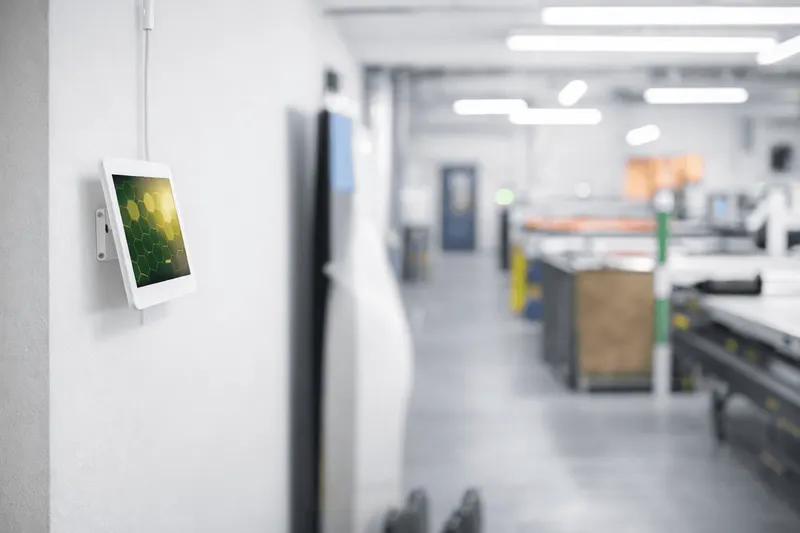
ChimeHive clock-in kiosk on a wall-mounted tablet beside the production floor of a manufacturing workshop
Live on the shop floorClock in from a wall-mounted tablet
€250k
Margin saved through more accurate quoting
€45k
Admin time saved each year
<1 hr
Weekly payroll, down from a full day

Results at Customer 1, a 50-person bespoke joinery manufacturer. Read the case study

Wave goodbye to paper timesheetsstacks of spreadsheetsadmin overheadwasted timepoor visibilityguesswork

Give your operators back the half hour spent remembering their day, and your office the day spent typing it up.

Features

Everything you need on the shop floor

Granular time tracking, attendance, leave and reporting in one light, simple system.

  • Granular job tracking

    Track time at any level, from customer to job, drawing and production stage. Know exactly where the hours go.

  • Time and attendance

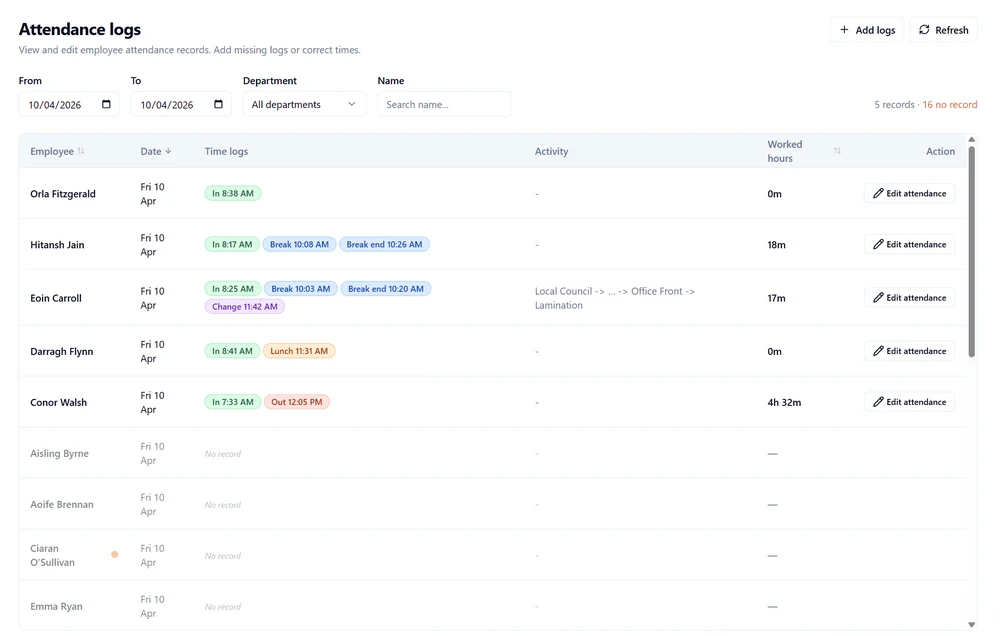
    See who is clocked in and where, live. Adjust attendance logs or send hours to payroll in one click.

  • Leave management

    Staff request leave and managers approve it in one place, with a clear view of who is off and when.

  • Insight reports

    Live dashboards and exports for fast billing, accurate payroll and better decisions, built around how you work.

ChimeHive attendance logs screen showing each employee's clock-in, break and job change times for the day, worked hours and an edit attendance button
Attendance logs: every clock-in, break and job change for the day, ready to correct or export.

How it works

From paperwork to planning

Accurate, reliable and real time. ChimeHive moves your team forward in three steps.

  1. Capture

    Operators tap in to the job

    Staff clock in on a shop-floor tablet or any browser and tap the job and stage they're working on. Breaks come off automatically.

    • Clock in from any tablet or browser
    • Log time against customers, jobs and stages
    • Face or PIN clock-in
  2. Insight

    Admin moves from paperwork to insight

    Hours flow straight into payroll and reports. No chasing sheets and no typing them into Excel.

    • Payroll exports in seconds
    • See who's working on what, right now
    • Hours ready for your MIS, ERP and project tools
  3. Plan

    Insight turns into forward planning

    Real data on every job shapes the next quote, the schedule and who works where.

    • Quote on what jobs really take
    • Put the right people on the right jobs
    • Forecast capacity and delivery dates

Built for bespoke manufacturers

  • Joinery and fit-out
  • Print, signage and branding
  • Metal fabrication
  • Bespoke engineering
  • Warehousing

Why ChimeHive

As granular as you need, in a light package

Simple time apps track hours. Enterprise systems track everything, after a six-month project. ChimeHive gives you job and stage detail without the overhead.

Detail where it counts

Customer, job, drawing, stage. Track time at the level your quoting needs.

Live in days, not months

Logins can be ready in a day or two. We set up your jobs, stages and reports with you.

Fair per-user pricing

Priced for growing manufacturers, not enterprise budgets. Add users as your team grows.

Shaped to your workflow

Custom reports and features, built around how your business runs.

Works with what you have

Sits alongside your MIS, ERP, payroll and project tools. Export, or connect by API.

People you can talk to

Hands-on onboarding and support from our team in Dublin.

Also included

  • Kiosk mode
  • Web and mobile access
  • Geo-location tagging
  • Facial recognition clock-in
  • Automatic breaks
  • Budget hours per job
  • Email notifications
  • Payroll exports
  • Document management
  • API integrations
  • MIS and ERP compatible

Case studies

Results from manufacturers using ChimeHive

Two Irish manufacturers, both on ChimeHive since December 2025.

Customer 1 · Bespoke joinery · 50 staff

Visibility of time on every job, and better quotes

Paper timesheets replaced with job and stage tracking. Quotes now reflect what each job really takes, and payroll takes under an hour.

“ChimeHive reduced a task that took a full day to a half hour to an hour.”

€250kMargin saved through more accurate quoting
€45kAdmin time saved a year
Read the Customer 1 case study

Customer 2 · Print, signage and branding · 61 staff

Leave, clocking and payroll prep, off paper

One system for leave requests and clocking in and out, with hours flowing automatically into Collsoft Payroll.

Staff clock in and request leave in one place. Managers approve leave without paperwork.

61Staff on one system for leave and clocking
0Hours re-keyed into payroll
Read the Customer 2 case study

Pricing

Choose your plan

Three plans to match your needs. Prices are per user, per month.

Basic

Clock in and out, done simply.

€10per user / month
  • Clock in and clock out
  • Web and kiosk access
  • Basic reporting
  • Geo-location
Sign up

Pro

The full platform.

Customtailored quote
  • Everything in Standard
  • Multiple reports and analytics for different users
  • Custom integrations
  • Extended on-call support
Get a custom quote

Online sign-up is coming soon. For now, Sign up takes you to a short form and we'll set up your account with you.

Eoin Carroll, founder and CEO of ChimeHive and Decision Analytics, at the ChimeHive stand
Eoin CarrollFounder and CEO

About

The story behind ChimeHive

ChimeHive is built by Decision Analytics, founded in Dublin by Eoin Carroll in 2022 to improve decision-making in manufacturing using analytics.

On Digital Discovery projects with manufacturers, the same question kept coming up: did we make money on that job? The hours were never properly recorded. Timesheets were on paper, filled in from memory and typed into Excel.

Insight needs data, so we searched the market for a tool to collect it. Nothing fitted, so we built ChimeHive with two of those clients, who became our first customers.

Today ChimeHive is backed by the Enterprise Ireland Pre-Seed Start Fund and focused on one thing: simple, accurate labour and job-level time capture that sits alongside your existing MIS and ERP.

FAQ

Frequently asked questions

Can you build a report we need?

Yes. We can build whatever report your business needs, from job costing and margin to payroll, attendance and leave. Just let us know what you want to see and we'll set it up for you. Email hello@chimehive.com.

Who is ChimeHive for?

Manufacturers that run bespoke, multi-stage jobs, such as joinery, print and signage, metal fabrication and engineering, and want to know the true time and margin on each job. It suits growing teams with an office and a production floor.

What hardware do I need?

Any web-enabled device. Most teams mount a standard tablet on the shop floor as a clock-in kiosk. Staff and managers can also use a phone, laptop or desktop browser.

Does ChimeHive work with our existing systems?

Yes. ChimeHive sits alongside your MIS, ERP, accounting and payroll systems. It has an API, and we set up integrations for you, or you can export hours for payroll and project tracking. Get in touch to talk through your setup.

How long does it take to get set up?

Logins can be ready within a day or two. We set up your customers, jobs, stages and reports with you, and you can run ChimeHive alongside paper timesheets for the first few weeks if you like.

How does facial recognition clock-in work?

Staff look at the kiosk camera and are clocked in within seconds. Facial recognition is optional and only used with each person's explicit consent, and staff can clock in with a PIN instead. It runs on secure AWS infrastructure, and biometric data is processed under GDPR Article 9.

Where is our data hosted?

ChimeHive is hosted on secure Amazon Web Services (AWS) infrastructure. Facial recognition also runs on AWS, so your data and facial IDs are stored and managed by AWS.

Can users log in from anywhere?

Yes. Any current smartphone, laptop or desktop can access ChimeHive with an internet connection. To keep clock-ins to your company kiosks, just don't share the company kiosk login details with staff.

How do I turn on GPS location for time tracking?

Turn on location services on your device and allow access when prompted. On iPhone or iPad: Settings, Privacy & Security, Location Services, On. On Android: Settings, Location, On. On a desktop, click Allow when your browser asks for your location. If you blocked it before, update your browser settings to allow location.

How do I reset my login?

Contact your company administrator to reset your login.

How do I sign up?

Choose a plan and press Sign up. Online sign-up is coming soon. For now, the button takes you to a short form and we'll set up your account with you.

Is there a free trial?

Instead of a free trial, we're happy to support a pilot with a team or site of your choice, so you can see ChimeHive working before you roll it out. Book a 15-minute consultation to plan it.

What's coming next?

Over the next 12 months: self sign-up, a guided onboarding wizard that recommends the right settings for your team, and AI chat so you can ask questions of your own data.

More FAQs

See ChimeHive in action

Book a quick demo and we'll show you how it works for your team.